

Your phone rings while you’re on a job. Nobody answers. A homeowner fills out a form at 8:47 p.m. Nobody sees it until tomorrow morning. Another customer wants to schedule service, but now your office is stuck in a five-message game of availability ping-pong.
Meanwhile, another company responded first and got the job.
This is where AI scheduling for home services can become genuinely useful. An AI scheduling system can help home service companies respond to inquiries, collect basic job information, identify appropriate appointment options, book qualified customers, send confirmations, and handle routine scheduling tasks without requiring someone to manually manage every interaction.
Table of Contents
- What Is an AI Scheduling System?
- Why Scheduling Is Such a Problem
- Reducing the Gap Between Lead and Appointment
- What Can an AI Scheduling System Actually Do?
- Qualify Before You Book
- Emergency Calls Need Different Treatment
- Understanding Your Service Area
- After Hours and Missed Calls
- Connecting With Existing Systems
- What Should Stay Human
- Where AI Voice Agents Fit
- What to Automate First
- Building Your AI Scheduling Workflow
- How to Measure Success
- Common Mistakes to Avoid
- Frequently Asked Questions
📞 You’re drowning in calls
Your phone rings constantly. Your team spends half their day playing scheduling tag with homeowners. Every missed call feels like money walking away. You need a system that can answer, qualify, and book without burning out your staff.
🌙 Leads come in after hours
Your best leads don’t respect business hours. They submit forms at 9 p.m., call on Sundays, and text on holidays. By the time your office opens, they’ve already called someone else. You need a way to respond when humans can’t.
⏱️ You’re losing leads to speed
Your marketing generates leads. Your team is good. But the gap between “interested” and “scheduled” is where customers disappear. Someone faster books them first. You need to close that gap without hiring three more people.
What Is an AI Scheduling System for Home Services?
An AI scheduling system uses artificial intelligence and automation to help move customers from an initial inquiry toward an available appointment.
Depending on how the system is configured, it may interact with customers through phone calls, website chat, text messages, online forms, email, or booking interfaces.
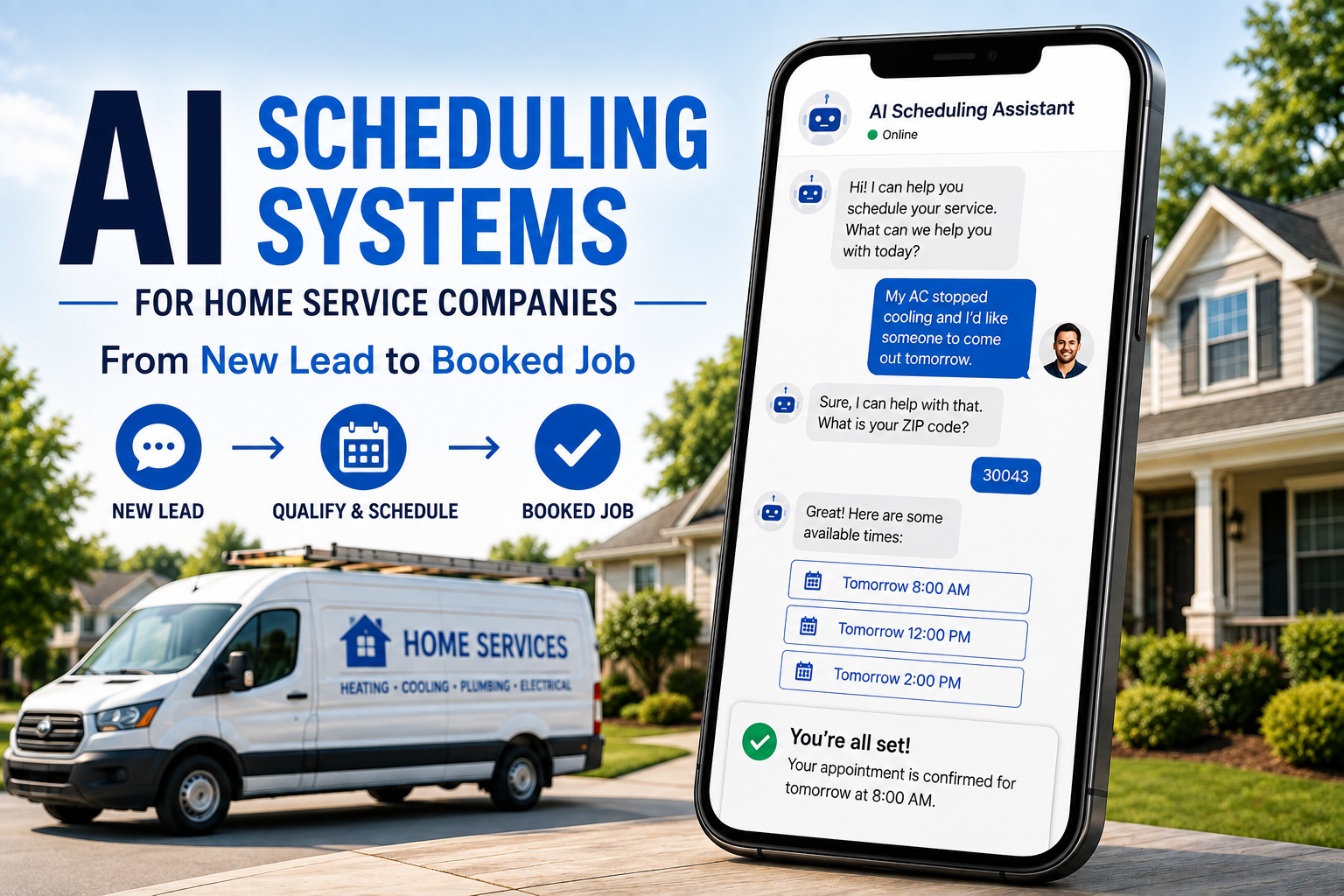
Instead of simply collecting a name and phone number for someone to deal with later, the system can potentially continue the conversation. A homeowner might say they need AC service tomorrow, and the system could collect relevant information, confirm the service area, check availability, offer appointment windows, and schedule the visit.
That is a much more useful workflow than “Thanks! Someone will contact you soon.”
“Soon” has lost plenty of leads.
Why Scheduling Is Such a Problem for Home Service Companies
Scheduling looks simple until you try doing it at scale.
A home service company may need to consider technician availability, service area, drive time, job type, appointment duration, required skills, emergency priority, existing appointments, customer availability, equipment requirements, and business hours.
Then add incoming phone calls, website forms, texts, cancellations, reschedules, and after-hours inquiries.
Suddenly, “put it on the calendar” isn’t so simple.
💡 Reality check: An HVAC company doesn’t want a technician driving across the service area unnecessarily. A plumbing company may need to prioritize an active leak over routine fixture replacement. An electrician may need different appointment lengths for troubleshooting versus installation estimates. A roofing company may schedule inspections differently from emergency tarp requests.
AI can help organize those interactions, but only when the system understands how the business actually operates.
AI Scheduling Can Reduce the Gap Between Lead and Appointment
Generating leads is only useful if your business can do something with them.
Imagine spending money on SEO, Google Ads, or Facebook Ads to generate an inquiry at 9:15 p.m. The customer also contacts two competitors. Your office opens at 8:00 the next morning. By then, one competitor has already answered the homeowner’s questions and scheduled an appointment.
You didn’t lose because your marketing was bad. You lost in the handoff.
AI scheduling can help shorten that gap by giving customers a way to continue moving forward even when your staff is unavailable.
What Can an AI Scheduling System Actually Do?
The capabilities vary depending on the software, integrations, and business rules involved. A properly configured system may help with several parts of the scheduling process.
Respond to New Inquiries
Instead of letting a form submission or missed call sit untouched, an automated system can begin the conversation quickly. It might ask what service you need, what problem you’re experiencing, your ZIP code, whether it’s an emergency, if you’re an existing customer, and what day works best.
The answers can help determine what should happen next.
Check Appointment Availability
When connected to the appropriate scheduling platform, the system can identify available appointment windows rather than promising times that don’t exist.
⚠️ Important: A scheduling assistant that books appointments your technicians cannot actually fulfill is not automation. It’s automated chaos.
Book Qualified Appointments
If the inquiry fits predefined rules, the customer may be able to move directly onto the calendar. For example, a customer needs an electrical panel replacement estimate, provides their ZIP code, and the system offers Tuesday afternoon or Wednesday morning appointments.
The exact workflow should reflect the business rather than forcing every company into the same script.
Send Confirmations and Reminders
Once an appointment is scheduled, automation can help send confirmation details and reminders including appointment date, arrival window, service requested, property address, preparation instructions, and rescheduling options.
That gives customers clarity without requiring office staff to manually send the same information all day.
Handle Rescheduling
Routine rescheduling can eat up a surprising amount of administrative time. When appropriate, an automated system can allow customers to request another available time without requiring multiple phone calls.
Route Complex Situations to a Person
This part matters.
Not every conversation should be automated. A good system should recognize situations that require human judgment and hand them off appropriately.
That might include angry customers, complicated project questions, unusual service requests, pricing disputes, safety concerns, situations outside established rules, or high-value opportunities requiring consultation.
The objective is not “AI handles everything.” The objective is AI handles what AI is good at and gets out of the way when a person is needed.
AI Scheduling Works Best When It Qualifies Before It Books
A full calendar is not automatically a good calendar.
If half the appointments are outside your service area, for services you don’t offer, or scheduled with the wrong technician, automation has made you busier without making you better.
Qualification should happen before booking when the situation requires it.
🔧 Plumbing Company
Should determine:
- Residential or commercial?
- Inside the service area?
- Emergency or routine?
- Drain issue, water heater, leak, fixture, or another service?
- Existing customer?
- Does the job require specific technician or equipment?
🏠 Roofing Company
May care about:
- Property location
- Repair versus replacement
- Residential versus commercial
- Storm-related damage
- Roof type
- Inspection request versus urgent leak
AI scheduling becomes much more valuable when those rules are designed around the company’s actual workflow.
Emergency Calls Should Not Be Treated Like Routine Appointments
This is especially important for HVAC, plumbing, electrical, restoration, and other urgent home services.
Consider the difference between:
Routine: “I’d like an estimate for replacing my water heater next month.”
Emergency: “Water is pouring through my ceiling right now.”
Those should not enter identical workflows.
An AI scheduling system can be configured to recognize urgency indicators and route the interaction differently. Depending on the company, that could mean offering emergency availability, transferring the call, alerting an on-call employee, providing an appropriate next step, or preventing the customer from selecting an unsuitable routine appointment.
AI doesn’t eliminate the need for operational judgment. Your operational judgment needs to be built into the system.
Your Scheduling System Needs to Understand Your Service Area
This sounds obvious. It isn’t always implemented well.
If your technicians serve a defined geographic area, the system should know it. Otherwise, you can end up scheduling customers who are outside your normal territory, too far away to serve profitably, in areas requiring additional travel charges, or in locations assigned to another branch.
Location can also affect scheduling efficiency. Two appointments may both be technically available at 2:00 p.m., but one may fit the technician’s route much better than the other.
More sophisticated scheduling workflows can use location and existing appointments to support better dispatch decisions.
💡 The goal isn’t simply to find an empty box on the calendar. It’s to create a schedule your team can realistically execute.
AI Scheduling Can Help After Hours
Homeowners don’t limit their problems to 9-to-5.
Air conditioners stop working at night. Pipes leak on Sundays. People remember they need a painter while sitting on the couch after dinner. Roof damage doesn’t check your office hours before showing up.
You don’t necessarily need someone sitting at a desk around the clock to capture every routine inquiry.
An AI scheduling system can give customers an immediate path forward after hours by collecting information and, when appropriate, helping them schedule the next step.
That doesn’t guarantee every inquiry becomes a job. It does mean the customer doesn’t automatically hit a dead end because your office is closed.
Missed-Call Recovery
Missed calls are especially frustrating because the customer was already trying to talk to you. Your marketing worked. They found you. They called. Then nobody picked up.
An automated follow-up workflow may be able to send a text after a missed call: “Sorry we missed you. What type of service do you need?”
From there, the conversation can continue. The system could collect basic details, answer appropriate questions, and help the customer schedule.
Instead of a missed call becoming a forgotten lead, it becomes another opportunity to continue the customer journey.
Scheduling Automation Should Connect With Your Existing Systems
An isolated AI tool can create more work instead of less.
Ideally, your scheduling workflow connects with the systems your business already depends on. That may include CRM, field service management software, calendar, phone system, website forms, customer database, SMS platform, email, lead tracking, and marketing attribution.
🚨 When systems aren’t connected: Customer calls AI. AI books appointment. Office employee copies appointment into dispatch software. Technician updates separate system. Marketing platform still thinks the lead never converted. Congratulations. You automated one task and created three more.
Integration matters.
AI Scheduling Should Not Pretend to Know What It Doesn’t Know
This is one of the biggest rules for using AI in a real business.
If the system doesn’t know the answer, it shouldn’t invent one.
That is particularly important around pricing, arrival times, warranties, technician availability, service eligibility, safety, financing, and guarantees.
If an exact price requires an inspection, the system should say that. If a technician’s arrival time isn’t confirmed, don’t manufacture one. If a customer asks something outside the approved information, route the question to someone who can answer it.
Automation becomes dangerous when convenience outruns accuracy.
What Should Stay Human?
Plenty.
AI can be excellent at repetitive, structured interactions. Humans remain much better suited for situations involving nuance, judgment, empathy, negotiation, and complexity.
Keep people involved when dealing with things like:
- Large project consultations
- Unusual customer problems
- Complaints
- Sensitive situations
- Complex estimates
- Technical recommendations
- Negotiations
- High-value opportunities
- Exceptions to normal business rules
Think of AI scheduling as a front-line coordinator, not the new owner of your company. Let it handle repetitive scheduling friction so your team has more attention available for the conversations that actually require expertise.
Where AI Voice Agents Fit Into Scheduling
Website chat is useful. Forms are useful. Text messaging is useful. But plenty of home service customers still prefer to call.
An AI voice agent can potentially answer an incoming call, collect information conversationally, determine the appropriate next step, and connect with scheduling workflows.
For example, a caller says their furnace isn’t turning on. The AI asks if they’re currently without heat, what ZIP code the property is in, and the workflow continues based on the company’s service rules.
This can be particularly useful for after-hours calls, overflow during busy periods, missed-call prevention, routine appointment requests, basic qualification, and scheduling and rescheduling.
What Home Service Companies Should Automate First
You don’t need to automate your entire operation on day one. In fact, you probably shouldn’t.
Start with predictable tasks.
✅ Good Early Automation Candidates
- New-lead acknowledgment
- Missed-call follow-up
- Basic qualification
- Service-area verification
- Routine appointment scheduling
- Appointment confirmation
- Reminder messages
- Simple rescheduling
- Follow-up requests
🚫 Keep Exceptions Out of the First Version
Don’t start by asking AI to solve every weird situation your business has encountered since 2007. Build the normal path first. Then identify where customers fall outside it. Add rules gradually.
Good automation gets smarter because the business improves the system—not because someone flipped an “AI” switch and hoped for magic.
How to Build an AI Scheduling Workflow
A practical implementation can start with five steps.
Step 1: Map Your Current Scheduling Process
Write down what actually happens when a new lead arrives. Not what the process manual says happens. What really happens. Document what happens when nobody answers, when the customer is outside the service area, when it’s an emergency, when no appointments are available, when the customer needs to reschedule, and when the inquiry requires an estimate.
Step 2: Identify Repetitive Decisions
Look for questions your team answers constantly. Do we service this ZIP code? Do we offer this service? What information do we need? Which appointment types can be booked directly? Which inquiries need a person? These rules form the backbone of the automated workflow.
Step 3: Decide Where Humans Take Over
Define clear escalation points. Don’t wait until something goes wrong to decide when a human should become involved.
Step 4: Connect the Right Systems
The scheduling system should have access to the information required to do its job without creating duplicate administrative work.
Step 5: Test Before Expanding
Test realistic scenarios. Call it. Text it. Try to confuse it. Ask for a service you don’t provide. Use an address outside your territory. Ask for an unavailable time. Try to reschedule. Pretend you’re an angry customer. Find the holes before your customers do.
How to Measure Whether AI Scheduling Is Actually Helping
Don’t judge an AI system because the demo looked cool. Judge it by what happens inside the business.
Useful measurements may include:
- Time from inquiry to first response
- Percentage of inquiries that reach scheduling
- Appointments booked after hours
- Missed calls recovered
- Qualified versus unqualified appointments
- Rescheduling volume
- No-show rate
- Staff time spent on scheduling
- Appointment errors
- Lead-to-booking rate
The right metrics depend on what you’re trying to improve. If your biggest problem is missed calls, measure missed-call recovery. If your office is drowning in scheduling tasks, measure administrative workload. If leads disappear between form submission and first contact, measure response time and progression to appointment.
💡 Remember: Automation needs a business objective. Otherwise, it’s just another subscription.
Common AI Scheduling Mistakes to Avoid
🚩 Automating a Broken Process
If your scheduling rules already confuse your staff, AI will not magically make them clearer. Fix the process first. Then automate it.
🚩 Giving AI Too Much Freedom
Define what the system can say, offer, schedule, and change. Guardrails matter.
🚩 Ignoring the Customer Experience
Efficiency for your office cannot come at the expense of making customers miserable. The interaction should still feel clear, useful, and respectful.
🚩 Never Reviewing Conversations
Automated interactions should be monitored. Look for questions the system struggles with, incorrect routing, common customer objections, missing information, failed bookings, and unnecessary handoffs.
🚩 Trying to Eliminate Humans Completely
That’s usually the wrong goal. The better goal is using humans where humans add the most value.
AI Scheduling Is Really About Removing Friction
The most useful AI scheduling systems aren’t impressive because they use AI. They’re impressive because the customer doesn’t have to wait until tomorrow to move forward.
The homeowner has a problem. They contact your company. They get a useful response. The system gathers what it needs. An appropriate appointment is offered. The customer books. Your team receives the information.
That’s it.
No phone tag. No forgotten form. No sticky note next to someone’s keyboard that says “CALL JOHN BACK.”
Just a cleaner path from inquiry to appointment.
Frequently Asked Questions About AI Scheduling for Home Services
What is AI scheduling for home services?
AI scheduling for home services uses artificial intelligence and automation to help manage customer inquiries, qualification, appointment availability, booking, confirmations, reminders, and other routine scheduling tasks.
Can AI schedule appointments for plumbers, HVAC companies, and electricians?
Yes, AI scheduling workflows can be designed for plumbers, HVAC companies, electricians, roofers, painters, landscapers, remodelers, and other home service businesses. The exact setup should reflect the company’s services, availability, service area, and scheduling rules.
Can AI scheduling work after business hours?
Yes. One of the practical uses of AI scheduling is allowing customers to begin or complete appropriate scheduling interactions when office staff are unavailable.
Can an AI scheduling system answer phone calls?
AI voice systems can be configured to handle certain phone interactions, including basic questions, lead qualification, information collection, and appointment scheduling. Complex or sensitive conversations should have an appropriate path to human support.
Will AI replace my receptionist or customer service team?
That doesn’t need to be the goal. AI can handle repetitive scheduling and qualification tasks while staff focus on complex customer needs, exceptions, sales conversations, and situations requiring human judgment.
Can AI scheduling connect to my CRM or calendar?
Many scheduling workflows can integrate with CRMs, calendars, field service platforms, phone systems, and other business software, depending on the platforms and integrations available.
How do I know if my home service company needs AI scheduling?
Look at where leads and staff time are being lost. Frequent missed calls, slow response times, heavy scheduling workloads, after-hours inquiries, repetitive qualification questions, and excessive scheduling back-and-forth can all signal opportunities for automation.
Your Next Customer Shouldn’t Have to Wait for Someone to Check the Calendar
Home service companies work hard to generate leads. You pay for ads, build SEO, collect reviews, improve your website, ask for referrals, wrap trucks, and post on social media. Then someone finally raises their hand and says “I need help.” Making them wait hours for someone to respond and find an appointment is a pretty rough final step.
AI scheduling won’t fix a bad business process, and it shouldn’t replace the human judgment your customers sometimes need. But used thoughtfully, it can remove the repetitive friction between “I’m interested” and “I’m booked.” That’s where the opportunity is. Not AI for the sake of saying you use AI. A better customer journey. A cleaner operation. And fewer good leads sitting around waiting for somebody to call them back.