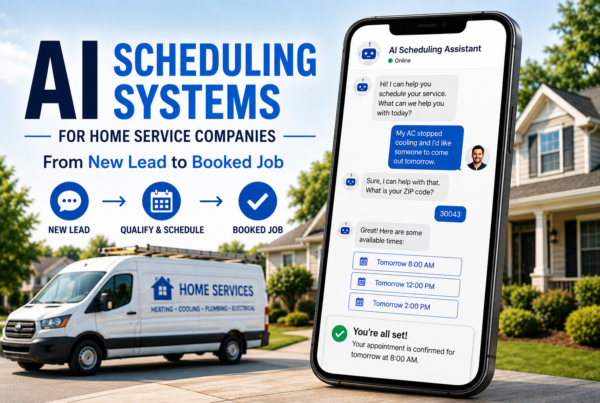


A lot of painting companies lose jobs before they ever get a “no.” The estimate gets sent, the homeowner gets busy, and the lead quietly disappears into the chaos of everyday life. That’s one reason more contractors are exploring AI automation for painting companies and follow-up systems that keep conversations moving without constant manual effort.
The challenge is rarely just lead generation. Many painting businesses already get calls, form submissions, Facebook inquiries, or estimate requests. The bigger issue is what happens after that first interaction.
This article explains how AI follow-up automations work, why painters are using them, what types of tasks they handle best, and where human communication still matters most.

What Is AI Automation for a Painting Company?
AI automation for a painting company refers to software systems that automatically manage repetitive communication and administrative tasks. These systems are often connected to CRMs, scheduling tools, websites, texting platforms, and lead forms.
In practical terms, that can include:
- Automatically responding to estimate requests
- Sending appointment reminders
- Following up on unanswered quotes
- Re-engaging old leads
- Qualifying inquiries before a phone call
- Organizing lead information into pipelines
The goal is not to replace people. The goal is usually to reduce delays, improve consistency, and prevent leads from slipping through the cracks.
For many contractors, speed matters more than they realize. A homeowner requesting multiple estimates may choose the first company that responds clearly and professionally.
Why Do Painting Leads Go Cold So Often?
One of the biggest misconceptions in home services marketing is that leads disappear because people are not interested. In reality, many leads go cold because communication stops too early.
Common reasons include:
Slow Response Times
If a prospect submits a form at night or during the weekend, they may wait hours or even days for a response. Automated systems can acknowledge inquiries immediately and set expectations for next steps.
Missed Follow-Ups
Painting companies are busy. During peak season, crews, scheduling, and estimates can easily consume the entire day. Follow-up tasks often become inconsistent.
Homeowners Need Time
A homeowner may not be ready to book the same day they request a quote. They might compare prices, discuss colors with a spouse, or wait until after a holiday or remodel project.
AI-driven follow-up systems help maintain light communication during that decision-making window.
Quotes Without Reminders
Many contractors send an estimate once and assume silence means rejection. In reality, people frequently forget to respond.
Simple reminders often recover opportunities that otherwise would have been lost.
How AI Follow-Up Systems Actually Work for Painters
Most AI automation systems follow a structured workflow.
Here’s a simplified example:
- A homeowner fills out a website estimate form
- The system sends an immediate confirmation text or email
- Lead details enter a CRM automatically
- The prospect receives reminders before appointments
- Follow-up messages trigger after the estimate is delivered
- The system pauses when the customer books or replies
The automation can also adjust based on customer behavior.
For example:
- If someone clicks a scheduling link but does not book, the system may send another reminder
- If a lead replies with questions, the workflow may notify a sales rep
- If a customer becomes inactive, the system can attempt re-engagement later
This type of structured communication is one reason AI tools are becoming more common in service industries.
For businesses researching broader systems like conversational assistants and automated lead handling, learning how AI voice agents and AI local SEO systems work together can provide additional context.
Can AI Follow-Up Automations Replace Sales Calls?
Not entirely.
AI follow-up systems work best when they handle repetitive communication while humans focus on relationship-building and closing.
Most painting jobs still involve trust, preferences, timelines, and budget discussions that benefit from real human interaction.
Automation is usually strongest in areas like:
- Appointment confirmations
- Quote reminders
- Basic qualification questions
- Missed call text-backs
- Review requests after project completion
- Re-engaging older leads
Human conversations still matter most for:
- Complex project discussions
- Objection handling
- Upselling services
- Building homeowner confidence
The best systems combine automation with personal communication instead of trying to eliminate one or the other.
How Much Time Can AI Automation Save Painting Contractors?
The exact time savings varies depending on company size and lead volume, but repetitive communication tasks often consume more hours than owners realize.
Common manual tasks include:
- Sending reminders
- Responding to missed calls
- Checking in on estimates
- Confirming appointments
- Repeating scheduling information
- Organizing lead notes
When automated, these tasks happen consistently in the background.
For smaller painting businesses, that may free up time for:
- More estimates
- Crew management
- Customer communication
- Job oversight
For larger operations, automation often improves process consistency across office staff and sales teams.
What Types of AI Tools Are Painters Using?
The term “AI automation” can mean different things depending on the setup.
Many painting companies use combinations of:
CRM Automation Platforms
These organize leads, automate follow-ups, and track customer communication.
AI Chat Assistants
These tools respond to website visitors or Facebook inquiries automatically.
AI Voice Systems
Some companies use voice agents to answer calls after hours or handle basic intake questions.
Automated Review Requests
After a project is complete, customers receive review reminders automatically.
Lead Qualification Systems
Some automations ask questions about project size, timeline, or location before scheduling.
As the technology evolves, more contractors are also exploring integrated systems that combine communication, scheduling, and local visibility strategies into one workflow.
For readers interested in related AI and automation topics, the Artificial Intelligence blog category covers additional educational resources and emerging trends in business automation.
What Makes an AI Follow-Up System Effective?
Not all automation improves customer experience. Poorly designed systems can feel robotic or overwhelming.
Professionals usually focus on three areas:
Timing
Too many messages feel spammy. Too few messages lose momentum.
Effective systems space communication naturally.
Tone
The language should sound conversational and human, not scripted or aggressive.
Clear Next Steps
Every message should reduce friction:
- Confirm the appointment
- Ask a simple question
- Provide scheduling options
- Clarify expectations
The strongest automation systems feel helpful rather than intrusive.
This is similar to how strong website experiences reduce friction for users navigating online. Concepts like the “Seamless Navigation Blueprint” emphasize removing confusion and helping users move naturally toward decisions.
How Long Does It Take to Set Up AI Automation for a Painting Business?
Setup time depends on complexity.
Simple workflows can sometimes be implemented within days, while more advanced systems involving CRM integrations, AI voice tools, and custom automations may take several weeks.
Common setup steps include:
- Connecting lead forms
- Mapping customer workflows
- Writing follow-up sequences
- Configuring reminders
- Testing triggers and responses
- Integrating calendars or scheduling systems
The planning stage is important because poorly structured automations often create confusion instead of efficiency.
FAQs: AI Automation for Painting Companies
How does AI automation help painting companies get more jobs?
AI automation helps painters respond faster, follow up consistently, and reduce missed opportunities from forgotten estimates or delayed communication.
Can AI send estimate follow-up texts automatically?
Yes. Many systems automatically send reminders, check-ins, or scheduling prompts after an estimate is delivered.
Is AI automation expensive for small painting businesses?
Costs vary widely depending on the software and setup. Some systems are relatively affordable, while larger custom workflows require more investment.
Does AI replace office staff at painting companies?
Usually no. Most painting companies use AI to support office staff by automating repetitive communication tasks rather than replacing people entirely.
What’s the difference between a CRM and AI automation?
A CRM stores customer and lead information. AI automation uses workflows, triggers, and messaging systems to automatically handle actions inside or alongside the CRM.
Can AI follow up with leads after hours?
Yes. One common use case is sending immediate responses to missed calls, website forms, or messages outside business hours.
Final Thoughts
AI follow-up automation is becoming more common in the painting industry because many businesses already generate leads but struggle with consistency after the first contact.
The technology is less about replacing people and more about improving communication timing, organization, and customer experience.
For painting companies handling multiple estimates, seasonal demand swings, and constant inbound inquiries, structured follow-up systems can help reduce friction throughout the booking process.
Understanding how these systems work makes it easier to evaluate which tools are useful, which workflows matter most, and where human interaction still creates the strongest customer relationships.
If you’d like to explore this topic further, related guides on automation, AI communication systems, and customer experience workflows can provide additional insight.