
Building an Electrician Website That Generates More Leads
Your website isn’t getting you enough service calls. You know it, your competitor down the street knows it, and every potential customer who lands on your site and leaves without calling definitely knows it.
Here’s the thing: having a website for your electrical contracting business isn’t enough anymore. The homeowner searching “electrician near me” at 9 PM because their breaker keeps tripping has six options in front of them. If your site doesn’t immediately answer their question, show you’re legit, and make it stupid-easy to contact you, they’re calling someone else.
This guide breaks down exactly what your electrician website needs in 2026 to turn visitors into booked service calls. Not theory. Not what looks cool. What actually converts.
Table of Contents
- Who This Guide Is For
- Mobile-First Design (Non-Negotiable)
- Contact Options That Actually Convert
- Service Pages That Rank and Sell
- Local SEO Features Built Into Design
- Trust Signals and Social Proof
- Emergency Service Visibility
- Online Booking Systems
- Page Speed and Technical Performance
- Professional Photography vs Stock Images
- Frequently Asked Questions
Which Type of Electrical Contractor Are You?
Solo or Small Crew
You handle calls yourself and need a site that filters tire-kickers, showcases your specific expertise, and works when you’re on a job site.
Priority: Simple contact options, clear service focus, booking system to capture off-hours leads.
Growing Local Business
You have a team, compete for commercial work, and need to demonstrate scale and professionalism to property managers and GCs.
Priority: Service area pages, project portfolio, commercial credibility signals, review volume.
Specialty Electrical Contractor
You focus on specific services—EV charger installation, solar integration, smart home systems—and need to educate while you sell.
Priority: Educational content, detailed service pages, case studies, technical credibility markers.
Mobile-First Design Is Non-Negotiable
Let’s start with the most important thing: 75% of people searching for an electrician are on their phone. Not “also on their phone sometimes.” Primarily on their phone. At the moment they need you.
If your site doesn’t load fast on mobile, if the phone number isn’t click-to-call, if forms are clunky, you lose. They’re calling the next result before your page even finishes rendering.
Reality check: Pull up your website on your phone right now. If you have to pinch-zoom to read anything or the call button isn’t immediately visible, you’re bleeding leads every single day.
What Mobile-First Actually Means
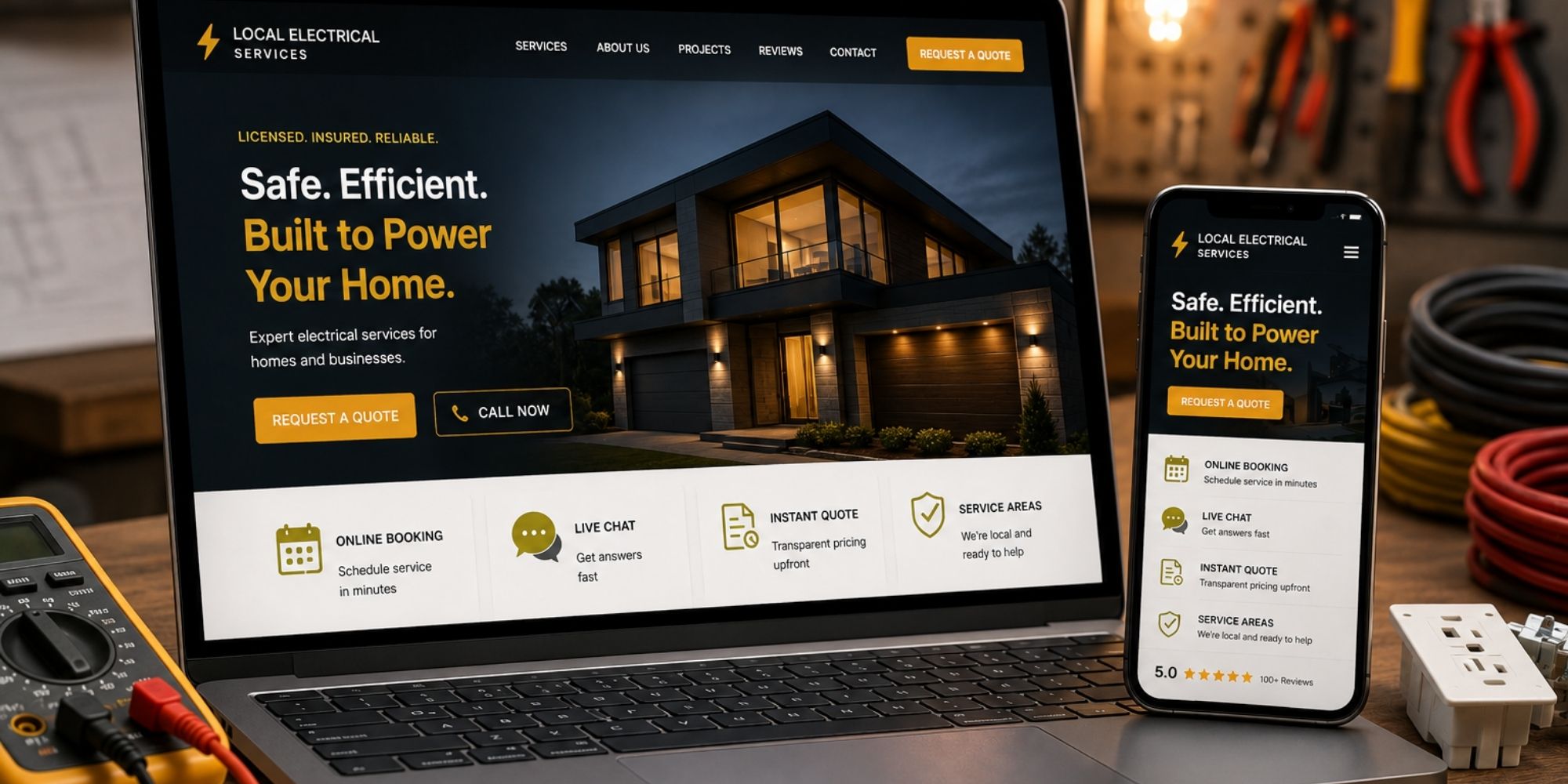
- Click-to-call phone numbers in the header, footer, and at least once mid-page
- Touch-friendly buttons (minimum 44×44 pixels, plenty of spacing)
- Readable text without zooming (16px minimum font size)
- Fast load times under 3 seconds on 4G (more on this below)
- Forms that don’t suck on mobile—big input fields, auto-complete enabled, minimal required fields
- Navigation that works with thumbs, not tiny desktop-sized links
Google indexes the mobile version of your site first now. If your mobile experience is trash, your rankings suffer. Simple as that.
Contact Options That Actually Convert
You’d be shocked how many electrical contractor websites make it hard to contact them. Email-only forms. Phone numbers buried in tiny footer text. Contact pages that require scrolling through three paragraphs before you see a number.
When someone lands on your site, they’re ready to make a decision right now. Your job is to remove every possible friction point between them and calling you.
❌ What Kills Conversions
- Phone number only in footer
- Contact forms with 8+ required fields
- No online booking option
- Generic “Contact Us” with no context
- Phone number as non-clickable image
- No after-hours messaging option
✅ What Actually Works
- Click-to-call in sticky header (always visible)
- Online booking widget for scheduled work
- Simple 3-field contact form (name, phone, brief message)
- Live chat or SMS option for quick questions
- Emergency call button that stands out visually
- Text message option for people who hate phone calls
Here’s the key: offer multiple contact methods and let the customer choose. Some people will only call. Some will only book online. Some want to text. If you force everyone down one path, you lose everyone who prefers a different method.
Pro tip: Use different phone numbers or tracking parameters for different contact points on your site. You’ll learn which placement converts best and where people drop off.
Most electricians find the sticky header click-to-call drives 40%+ of their phone leads. Make it impossible to miss.
Service Pages That Rank and Sell
Your homepage can’t do everything. Every service you offer needs its own dedicated page. Not because it looks professional (though it does), but because that’s how you capture search traffic and convert visitors.
Someone searching “panel upgrade electrician” doesn’t want to land on your homepage and hunt for that service in a dropdown menu. They want to land on a page that immediately confirms you do panel upgrades, explains what’s involved, shows you’ve done this work before, and gives them a way to get a quote.
Essential Service Pages for Electrical Contractors
Residential Services
- Electrical panel upgrades
- Whole-home rewiring
- Outlet and switch installation
- Lighting installation and design
- Ceiling fan installation
- Generator installation
- Surge protection
Commercial Services
- Commercial electrical installation
- Tenant improvement work
- Electrical maintenance contracts
- Parking lot lighting
- Code compliance upgrades
- Emergency commercial service
Specialty Services
- EV charger installation
- Smart home wiring
- Solar panel integration
- Home automation
- Landscape lighting
- Pool and spa electrical
What Every Service Page Must Include
A good service page isn’t just a description. It needs to answer the questions someone has before they’re ready to call and give them confidence you’re the right choice.
- Clear headline with the service name (“Panel Upgrade Services in [Your City]”)
- What the service includes—specific scope, not vague marketing language
- Why someone needs this service—the problems it solves
- Pricing transparency—even if it’s a range or starting price
- Photos of actual completed work, not stock images of electricians posing with tools
- Relevant credentials—licenses, certifications, manufacturer partnerships
- Customer reviews specific to that service
- Clear CTA—”Schedule Your Panel Upgrade” beats generic “Contact Us”
- Related services—internal links to other relevant pages
The goal is simple: when someone lands on your panel upgrade page, they should understand what you do, believe you do it well, and know exactly how to hire you. If any of those three things are unclear, they bounce.
Local SEO Features Built Into Design
Here’s something most web designers won’t tell you: your site’s design directly impacts your local search rankings. Not just the content, but how the site is structured.
Google wants to show electricians who actually serve the searcher’s area. If your site doesn’t clearly communicate where you work, you don’t rank for those searches. Period.
Service Area Pages (Your Secret SEO Weapon)
Every city or county you serve should have its own dedicated page. Not a single “Service Areas” page with a list of places. Individual pages optimized for “[Service] in [City]” searches.
These pages should include:
- Specific location in the headline (“Electrical Services in [City Name]”)
- Local context—mention neighborhoods, landmarks, common local issues
- Services you offer in that area with internal links to service pages
- Reviews from customers in that location
- Embedded Google Map showing your service coverage
- Local NAP (Name, Address, Phone—even if you don’t have a physical office there)
- Response time commitment for that service area
Warning: Don’t spam service area pages with identical content. Google’s smarter than that. Each page needs genuinely unique, helpful information about serving that specific area.
Focus on quality over quantity. Five well-optimized location pages beat 30 thin, duplicate pages every time.
Schema Markup (The Technical SEO You Can’t Skip)
Schema markup is code that tells Google exactly what your business does, where you serve, your hours, services, and reviews. It helps you show up in rich results—those enhanced search listings that take up more space and get more clicks.
Your electrician website needs:
- LocalBusiness schema with accurate NAP info
- Service schema for each service you offer
- Review schema to show star ratings in search results
- FAQPage schema for FAQ sections (helps you grab featured snippets)
- Service area markup defining your coverage zones
Most website builders have plugins for this. If your site doesn’t have schema markup, you’re giving competitors an advantage for zero good reason. For more ways to improve your online visibility and turn search traffic into leads, explore more website resources.
Trust Signals and Social Proof
Nobody’s calling an electrician they don’t trust. Your website has about 8 seconds to establish credibility before someone decides you’re legit or moves on.
Trust signals aren’t optional. They’re the difference between “I’ll call them” and “I’ll keep looking.”
🏆 Essential Credentials
- License number (visible, verifiable)
- Insurance certificates
- Bonding information
- Years in business
- Manufacturer certifications
- Industry association memberships
- Better Business Bureau rating
⭐ Customer Proof
- Google reviews (50+ minimum)
- Review average prominently displayed
- Recent reviews with dates
- Video testimonials if possible
- Before/after project photos
- Case studies for major projects
🛡️ Guarantees & Policies
- Workmanship warranty details
- Satisfaction guarantee
- Response time commitments
- Free estimate policy
- Upfront pricing promise
- Drug testing/background checks
Reviews: Volume Matters More Than You Think
Here’s the reality: a business with 200 reviews and a 4.6 average beats a business with 12 reviews and a 5.0 average. Every single time.
Review volume signals trust at scale. It tells visitors you’ve done this work hundreds of times. A perfect 5.0 with only a few reviews looks suspicious or new.
Your website should:
- Display your Google review average and count prominently (above the fold)
- Show recent reviews with full text on relevant pages
- Include photos from customer reviews when available
- Feature video testimonials if you have them (video trust factor is 3x written reviews)
- Link to your Google Business Profile so visitors can read all reviews
Don’t bury reviews on a separate testimonials page nobody visits. Weave them into service pages, location pages, your homepage. Social proof works best when it’s contextual.
Emergency Service Visibility
Emergency calls are the highest-value leads you get. Someone with a sparking outlet or a dead panel at 10 PM doesn’t care about your brand story. They need help now, and they’ll pay premium rates for it.
If your site doesn’t immediately communicate that you handle emergencies 24/7, you’re losing those calls to competitors who do.
Emergency Service Checklist
- Emergency call button in sticky header (different color, stands out)
- “24/7 Emergency Service” badge or banner on homepage
- Dedicated emergency service page explaining response times, what qualifies as emergency, pricing structure
- After-hours contact method clearly stated (even if it’s “call this number, we answer 24/7”)
- Response time guarantee (“We arrive within 60 minutes for emergency calls in [Service Area]”)
- Emergency services you offer—be specific (power outages, electrical fires, sparking outlets, panel failures)
Visual hierarchy matters here. Your emergency CTA should be the most prominent element on mobile. Use contrasting color, larger text, maybe even an icon. Make it impossible to miss.
Online Booking Systems: Worth It or Waste of Money?
Five years ago, online booking for electricians was optional. In 2026, it’s expected—at least for non-emergency work.
Here’s why: a growing percentage of your potential customers will not call you. Not because they’re not interested. Because they hate phone calls, they’re busy during your business hours, or they want to book at 11 PM while scrolling on the couch.
When Booking Systems Make Sense
✅ Great For:
- Service calls and inspections
- Routine maintenance appointments
- Follow-up visits for existing projects
- Consultations and estimates
- Scheduled installations (ceiling fans, outlets, etc.)
- Capturing leads outside business hours
❌ Not Ideal For:
- Emergency calls (these need immediate phone contact)
- Complex projects requiring detailed scoping
- Commercial bids
- Jobs that need on-site assessment first
Solution: Offer both. Booking for routine work, phone/form for everything else.
What Good Booking Systems Look Like
A booking system that converts doesn’t require users to create accounts, answer 15 questions, or navigate five screens. The best ones:
- Show real availability synced with your actual schedule
- Require minimal info upfront (name, contact, service type, preferred date/time)
- Work seamlessly on mobile (big buttons, easy date selection)
- Send confirmation immediately to the customer and your team
- Integrate with your scheduling software so you’re not managing two calendars
- Allow customers to reschedule/cancel without calling (reduces no-shows)
Reality check: Track how many bookings you get online vs phone calls. Most electricians find online booking adds 15-25% more leads, primarily outside business hours. That’s revenue you’d miss otherwise.
Page Speed and Technical Performance
Your website could have perfect design, compelling copy, and clear CTAs. If it loads slowly, none of that matters.
Google’s data shows that 53% of mobile visitors abandon sites that take longer than 3 seconds to load. And that was a few years ago. Expectations are even higher now.
Page speed isn’t just user experience. It’s a direct Google ranking factor. Slow sites rank lower, get fewer visitors, and convert worse. Triple penalty.
What Kills Website Speed (and How to Fix It)
🐌 Speed Killers
- Massive uncompressed images
- Too many plugins (WordPress)
- Render-blocking JavaScript
- No caching enabled
- Cheap shared hosting
- Unoptimized code
- Too many external scripts (tracking, chat, forms)
⚡ Speed Fixes
- Compress all images (WebP format)
- Enable browser and server caching
- Use a CDN for faster global delivery
- Lazy-load images below the fold
- Minimize CSS and JavaScript
- Choose quality hosting (not $3/month plans)
- Limit third-party scripts ruthlessly
📊 Speed Targets
- Mobile load time: Under 3 seconds
- Desktop load time: Under 2 seconds
- Largest Contentful Paint: Under 2.5s
- First Input Delay: Under 100ms
- Cumulative Layout Shift: Under 0.1
- PageSpeed score: 90+ (mobile and desktop)
Test your site speed at PageSpeed Insights (Google’s free tool). It’ll show you exactly what’s slowing you down and how to fix it. Run the test monthly—speed degrades over time as you add content.
Professional Photography vs Stock Images
Stock photos of electricians in clean uniforms holding tools in staged settings look exactly like what they are: fake.
Visitors can spot stock imagery instantly, and it destroys trust. If you’re not showing your actual team doing actual work, you’re telling people you don’t have real projects to show off.
What Actually Works: Real Project Photos
You don’t need a professional photographer following you on every job (though if you can afford it, it’s worth it). You need your team taking quality photos of completed work with their phones.
Photos that build trust:
- Before/after panel upgrades—nothing sells this service better
- Your actual team on job sites (with permission, obviously)
- Completed installations—EV chargers, generators, new wiring, lighting
- Your truck/van with branding (signals you’re a real local business)
- Close-ups of quality work—clean wire runs, proper labeling, organized panels
- Commercial projects if you do that work
Photo quality matters, but authenticity matters more. A slightly grainy phone photo of a real project you completed beats a perfect stock image every time.
Make it a company policy: every completed project gets photographed. Build your visual library over time.
Where to Use Photos for Maximum Impact
- Homepage hero section—your team in action, not stock photos
- Service pages—examples of that specific service completed
- Location pages—projects in that specific area
- Review sections—customer photos when available
- About page—team photos, office/shop, vehicles
- Blog posts—relevant project examples supporting the content
Every photo should serve a purpose: prove you do this work, show the quality of your work, or build familiarity with your brand. Random decorative images waste space and slow down your site.
Frequently Asked Questions
What should an electrician website include to generate more leads?
An electrician website that generates leads must include click-to-call phone numbers, an online booking system, service area pages with local specifics, customer reviews prominently displayed, mobile optimization, clear service descriptions with transparent pricing information, emergency service callouts, live chat or contact forms, and trust signals like licensing and insurance information. The most critical element is making it ridiculously easy for someone to contact you the second they decide they need an electrician.
What makes a good website for an electrical contractor?
A good electrical contractor business website combines fast loading speed (under 3 seconds on mobile), mobile-first design, clear navigation, local SEO optimization with service area pages, proof of expertise through reviews and credentials, easy contact options, professional imagery showing real work, transparent service information, and conversion-focused design that guides visitors toward booking. The design should build trust immediately and remove every possible friction point between a visitor landing and calling you.
How can electricians turn more website visitors into booked service calls?
Converting website visitors into booked calls requires prominent click-to-call buttons on mobile, online booking functionality, social proof through reviews and project photos, emergency service visibility, clear service area coverage, transparent pricing ranges, trust signals like licenses and certifications, fast page speed, simple contact forms, and strategic CTAs throughout the user journey. The key is reducing decision fatigue and making the next step obvious at every stage.
Do electricians really need an online booking system in 2026?
Yes. Online booking has shifted from nice-to-have to expected, especially for service calls and routine work. Customers increasingly prefer scheduling without phone calls, particularly younger homeowners and commercial clients. A booking system captures leads outside business hours, reduces phone volume, and converts visitors who prefer self-service. For emergency calls, you still need prominent phone numbers, but for scheduled work, booking systems significantly increase conversion rates.
Should electricians invest in custom website design or use a template?
Most electrical contractors get better ROI from a well-customized template or builder platform than fully custom development. The critical factors are mobile optimization, local SEO setup, conversion features, and professional appearance—all achievable without custom code. Invest budget in professional copywriting, quality photos of your actual work, review generation, and ongoing SEO rather than expensive custom development. Custom design makes sense only if you have specific functionality requirements or operate at significant scale.
What pages should every electrician website have?
Every electrical contractor website needs a homepage with clear services and contact options, individual service pages for each offering, location/service area pages targeting specific cities or counties, an about page with credentials and team info, a reviews or testimonials page, a contact page with multiple options, a blog for SEO and expertise demonstration, and potentially a projects/gallery page. Each service area you cover should have its own optimized page to capture local search traffic.
How important is page speed for an electrician website?
Page speed is critical. Google’s data shows that 53% of mobile visitors abandon sites that take longer than 3 seconds to load. Page speed is also a direct Google ranking factor—slow sites rank lower, get fewer visitors, and convert worse. Your mobile load time should be under 3 seconds, desktop under 2 seconds. Use tools like PageSpeed Insights to identify and fix speed issues. Common culprits include uncompressed images, too many plugins, cheap hosting, and excessive third-party scripts.
Should I use stock photos or real photos of my electrical work?
Always use real photos of your actual work. Stock photos of electricians in staged settings destroy trust—visitors can spot them instantly. Real project photos prove you do the work you claim to do. Focus on before/after panel upgrades, completed installations, your actual team on job sites, your branded trucks, and close-ups of quality work. A slightly grainy phone photo of a real project beats a perfect stock image every time. Make it company policy to photograph every completed project.
How many Google reviews do electricians need to be competitive?
Review volume matters more than most electricians realize. A business with 200 reviews and a 4.6 average beats a business with 12 reviews and a 5.0 average every time. Review volume signals trust at scale and tells visitors you’ve done this work hundreds of times. Aim for 50+ reviews minimum to be competitive in most markets, with ongoing review generation to stay ahead. Display your review average and count prominently above the fold, and show recent reviews with full text on relevant pages.
Ready to Build a Website That Actually Gets You Service Calls?
Most electrical contractors are sitting on a website that’s costing them thousands in missed opportunities every month. The good news? Fixing it doesn’t require a complete rebuild—just strategic improvements focused on what actually drives conversions.
We’ve helped hundreds of home service businesses turn their websites into lead-generating machines through smarter design, local SEO, and targeted Google Ads campaigns. Want to see how your current site stacks up?
No pressure. No pitch. Just a straight conversation about what’s working, what’s not, and what you should focus on first.